 teasa.ai
How do I delete or reset a chat on Teasa?
To delete a chat on Teasa, open Chats, open the chat's menu and choose Delete chat; to erase a Story or a Character chat with everything that goes with it, open the chat and use Reset Story or Reset Character chat in Chat options.
Delete a chat
- On the web: open Chats, right-click or long-press the chat to open its menu and choose Delete chat.
- In the app: long-press a chat to select it, tap more chats to select several, then tap the bin icon.
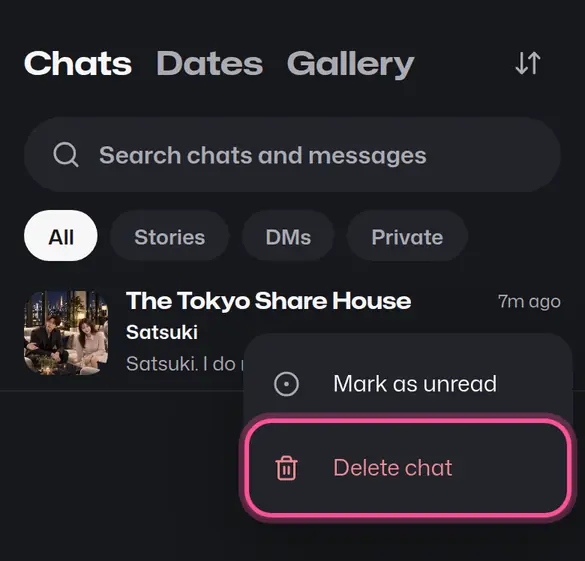
Archive only hides a chat from your list. Deleting removes it.
Start a Story or a Character chat over
Open the chat, then Chat options.
| Option | Where | What it deletes |
|---|---|---|
| Reset Story | In a Story | Every playthrough of that Story and the memories saved from them |
| Reset Character chat | In a DM | All your chats with that Character, your shared memories and your bond progress |
The reset screen lists what will be deleted before you confirm. A reset can't be undone. Resetting a Character chat keeps your date Stories, your other Characters and your Story conversations.
Remove a single memory instead
To keep the chat and remove only something a Character remembers about you, open Settings, then Privacy & safety, then What Teasa remembers, and delete that memory.
Your next step
Open Chats to tidy up your conversations.
Open ChatsUpdated