 teasa.ai
Do Characters on Teasa remember what I tell them?
Yes: as you play, Teasa saves the lasting facts you share and the milestones you earn, and Characters recall them in DMs and in Stories, whichever chat style you play; you can see what each Character remembers, forget what you choose and pause new memories at any time.
What Teasa remembers
- Facts that matter later: names, likes, plans and what happened between you.
- The relationship milestones you earn with each Character.
- Where each fact came from, so you can check it.
Where Characters use it
| Where you chat | What the Character can recall |
|---|---|
| DMs | Facts about you, what that Character saw with you and your milestones together |
| Stories, in every chat style | Facts about you, this playthrough's own facts and what its Characters saw with you elsewhere |
See and forget memories
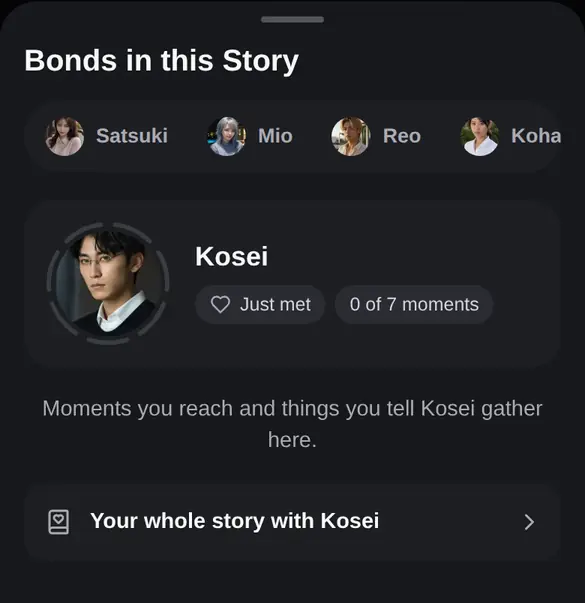
- In a chat, open the chat options and tap Bond. In a Story, choose the Character first.
- Under What Mina remembers, tap Forget on anything you want gone. Undo brings it back for a few seconds.
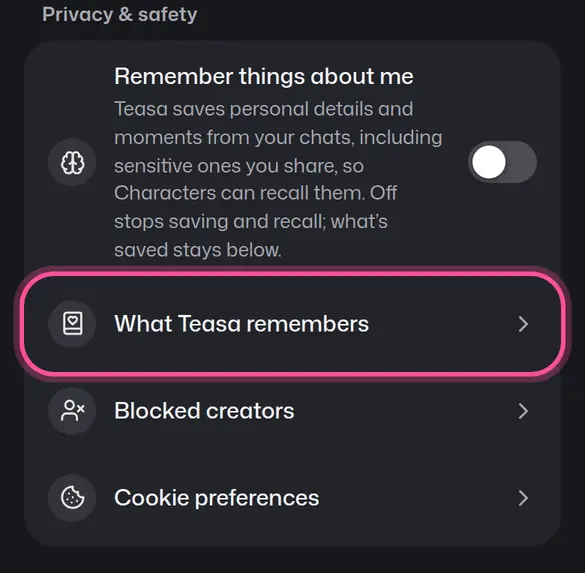
- To see every memory at once, open Settings, then Privacy & safety, then What Teasa remembers.
Pause new memories
Open Settings, go to Privacy & safety and turn off Remember things about me. New memories and milestones pause; the ones already saved stay until you forget them. In the EEA, the UK and Switzerland, memory starts off: turn the same switch on to begin.
How much is kept
| Free account | Teasa Basic | Teasa Pass | Teasa Pass Pro | |
|---|---|---|---|---|
| Facts about you | Up to 50 | Up to 200 | Up to 2,000 | Unlimited |
| Facts per conversation | Up to 100 | Up to 100 | Up to 300 | Up to 300 |
When a plan ends, every saved fact is kept. Your memories are part of your data export and are deleted with your account.
For what a reply can see, Keep in memory pins and how to make a Character remember you, read how AI character memory works on Teasa.
Your next step
Message a Character, tell them something about you and see it come back later.
Message a CharacterUpdated