 teasa.ai
What is a persona on Teasa, and how do I use one?
A persona is an optional character you play as in Stories and DMs, with its own name and description, so Characters know you by that name instead of your account name; create one in Settings, under Chat & voices, then Personas, and switch it in any chat from Chat options, then Persona.
Some apps call this a talk profile or a chat profile. On Teasa it's a persona.
Create a persona
- Open Settings, then Chat & voices, then Personas.
- Give your persona a name. Add a description of who they are: background, appearance, personality, whatever you want Characters to know. Pronouns and a portrait are optional.
- Tap Add persona. Your first persona becomes your default; once you have two or more, choose Make default on the one to play as everywhere unless you pick another.
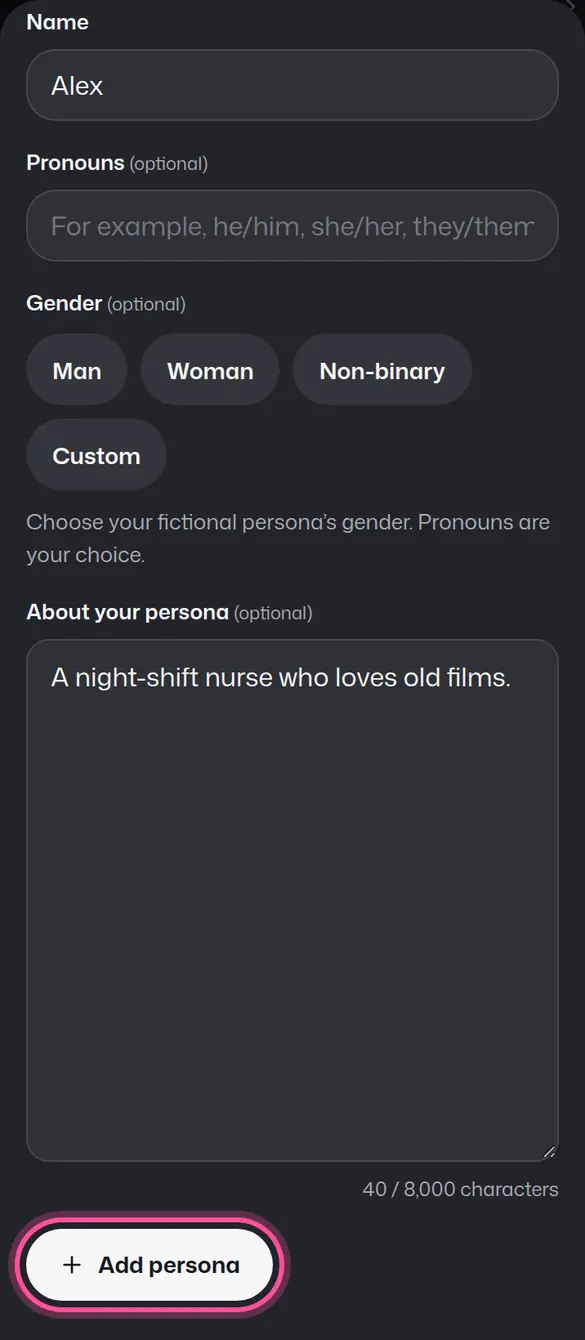
You can have more than one persona and edit them any time.
Switch persona in a chat
Open the chat, then Chat options, then Persona, and choose who you are playing as.
Your persona and your account
Your persona is fiction. Your account profile, its public name and your date of birth stay separate, and you can play without a persona at all.
Your next step
Create a persona in Settings, then pick a Story to play as them.
Open SettingsUpdated